


Custom Binned PDFs#
A key feature of zfit is the ability to create custom PDFs and models. While unbinned PDFs operate on continuous data, binned PDFs work with histogrammed data where events are grouped into bins.
In this tutorial, we will demonstrate how to create custom binned PDFs using two different approaches:
_rel_countsmethod: For relative counts (normalized to 1)_countsmethod: For absolute counts (used in extended PDFs)
What are Binned PDFs?#
Binned PDFs in zfit work with discrete bins rather than continuous probability densities. They are particularly useful for:
Template fitting (e.g., Monte Carlo templates)
Histogram-based analyses
Dealing with large datasets where binning improves computational efficiency
Modeling discrete processes or when continuous approximations break down
import matplotlib.pyplot as plt
import numpy as np
import zfit
import zfit.z.numpy as znp
from zfit import z

# Set up plotting
plt.style.use('default')
np.random.seed(42)  # For reproducible examples
Theory: _rel_counts vs _counts#
When creating custom binned PDFs in zfit, you need to implement one or both of these key methods:
_rel_counts(self, x, params)#
Purpose: Returns the relative number of events in each bin
Normalization: Values sum to 1.0 (relative/normalized counts)
Use case: Standard (non-extended) binned PDFs
Mathematical meaning: Probability of finding an event in each bin
Returns: Tensor with shape matching the binning structure
_counts(self, x, params)#
Purpose: Returns the absolute number of events in each bin
Normalization: Values sum to the total expected number of events
Use case: Extended binned PDFs where the total number of events is a parameter
Mathematical meaning: Expected number of events in each bin
Returns: Tensor with shape matching the binning structure
Important Note about Extended PDFs#
For extended PDFs that implement _counts, zfit automatically provides rel_counts() functionality. However, the behavior may depend on the specific zfit version and context. When working with extended PDFs, focus on implementing _counts correctly.
Both methods should be decorated with @zfit.supports() to specify which features they support.
Example 1: Custom Binned PDF with _rel_counts#
Let’s create a custom binned Gaussian PDF that implements the _rel_counts method. This will return normalized counts that sum to 1.
class CustomBinnedGaussian(zfit.pdf.BaseBinnedPDF):
    """A custom binned Gaussian PDF using _rel_counts method."""

    def __init__(self, mu, sigma, obs, name=None, label=None):
        # Define the parameters for our PDF
        params = {
            'mu': mu,      # mean parameter
            'sigma': sigma # standard deviation parameter
        }

        # Call parent constructor
        super().__init__(obs=obs, params=params, name=name, label=label)

    @zfit.supports(norm="space")
    def _rel_counts(self, x, params):
        """
        Calculate the relative counts (normalized) for each bin.

        Args:
            x: Binned data or space (typically not used directly in binned PDFs)
            params: Dictionary containing the PDF parameters

        Returns:
            Tensor of relative counts that sum to 1.0
        """
        mu = params['mu']
        sigma = params['sigma']

        # Get the bin centers from the observation space
        # For binned PDFs, we work with the binning structure
        obs_space = self.space
        binning = obs_space.binning
        bin_centers = binning.centers[0]  # Get centers for first (and only) axis

        # Calculate Gaussian values at bin centers
        gaussian_values = znp.exp(-0.5 * ((bin_centers - mu) / sigma) ** 2)

        # Normalize to get relative counts (sum to 1)
        normalized_values = gaussian_values / znp.sum(gaussian_values)

        return normalized_values
Testing the _rel_counts Custom PDF#
Let’s create and test our custom binned Gaussian PDF:
# Create binned observation space
n_bins = 50
binning = zfit.binned.RegularBinning(n_bins, -5, 5, name="x")
obs_binned = zfit.Space("x", binning=binning)

# Create parameters
mu_param = zfit.Parameter("mu", 0.5)
sigma_param = zfit.Parameter("sigma", 1.2)

# Create our custom binned PDF
custom_gauss = CustomBinnedGaussian(mu=mu_param, sigma=sigma_param, obs=obs_binned,
                                   name="CustomGaussian")

print("Created custom binned Gaussian PDF")
print(f"Parameter values: μ = {mu_param.value():.2f}, σ = {sigma_param.value():.2f}")

# Test the rel_counts method
rel_counts = custom_gauss.rel_counts(obs_binned)
print(f"Sum of relative counts: {znp.sum(rel_counts):.6f} (should be 1.0)")
print(f"Shape of rel_counts: {rel_counts.shape}")
print(f"First 5 rel_counts values: {rel_counts[:5]}")
Created custom binned Gaussian PDF
Parameter values: μ = 0.50, σ = 1.20
Sum of relative counts: 1.000000 (should be 1.0)
Shape of rel_counts: (50,)
First 5 rel_counts values: [2.66419431e-06 5.56230618e-06 1.12948417e-05 2.23070259e-05
 4.28488784e-05]
# Visualize the custom binned PDF
fig, ax = plt.subplots(figsize=(10, 6))

# Get bin centers for plotting
bin_centers = obs_binned.binning.centers[0]
rel_counts_values = rel_counts.numpy()

# Plot as histogram
ax.bar(bin_centers, rel_counts_values, width=0.18, alpha=0.7,
       label=f'Custom Binned Gaussian (μ={mu_param.value():.1f}, σ={sigma_param.value():.1f})',
       color='skyblue', edgecolor='navy')

# Also plot the true continuous Gaussian for comparison
x_continuous = np.linspace(-5, 5, 200)
true_gaussian = np.exp(-0.5 * ((x_continuous - mu_param.value()) / sigma_param.value()) ** 2)
true_gaussian = true_gaussian / np.sum(true_gaussian) * len(true_gaussian) / n_bins  # Scale for comparison

ax.plot(x_continuous, true_gaussian, 'r-', linewidth=2,
        label='True Continuous Gaussian (scaled)')

ax.set_xlabel('x')
ax.set_ylabel('Relative Counts')
ax.set_title('Custom Binned PDF with _rel_counts Method')
ax.legend()
ax.grid(True, alpha=0.3)

plt.tight_layout()
plt.show()

print(f"Plotted {len(bin_centers)} bins with relative counts")
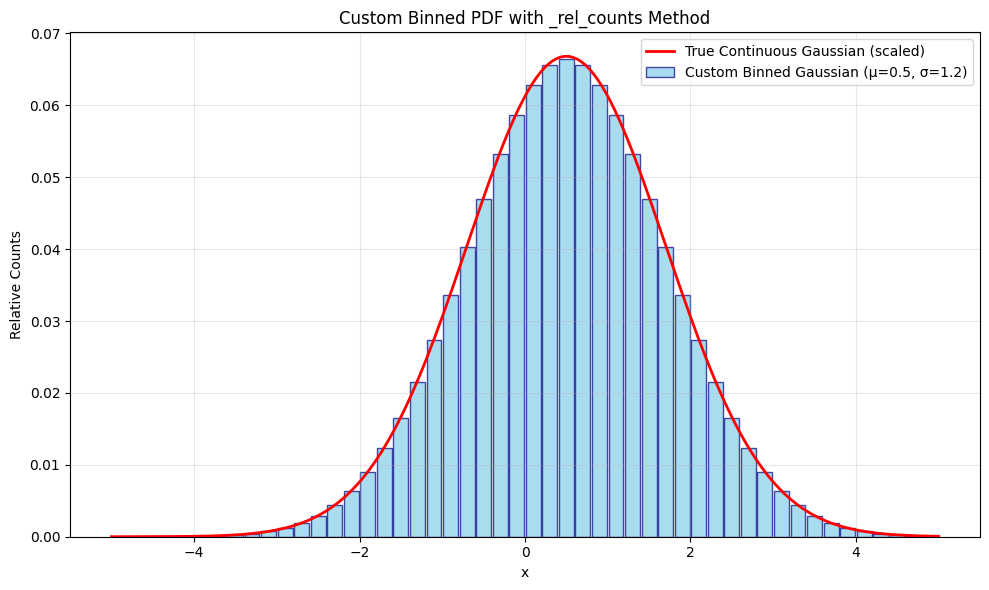
Plotted 50 bins with relative counts
Example 2: Custom Extended Binned PDF with _counts#
Now let’s create an extended binned PDF that implements the _counts method. This returns absolute counts (not normalized), making it suitable for extended maximum likelihood fits.
class CustomExtendedBinnedPoisson(zfit.pdf.BaseBinnedPDF):
    """A custom extended binned Poisson-like PDF using _counts method."""

    def __init__(self, rate, total_events, obs, name=None, label=None):
        # Define the parameters
        params = {
            'rate': rate,           # Rate parameter (like lambda in Poisson)
            'total_events': total_events  # Total number of events (extended parameter)
        }

        # For extended PDFs, we need to set extended=True
        super().__init__(obs=obs, params=params, extended=True, name=name, label=label)

    @zfit.supports(norm="space")
    def _counts(self, x, params):
        """
        Calculate the absolute counts for each bin.

        Args:
            x: Binned data or space
            params: Dictionary containing the PDF parameters

        Returns:
            Tensor of absolute counts (not normalized)
        """
        rate = params['rate']
        total_events = params['total_events']

        # Get the bin centers from the observation space
        obs_space = self.space
        binning = obs_space.binning
        bin_centers = binning.centers[0]

        # Create a Poisson-like distribution
        # Using exponential decay as an example shape
        shape_values = znp.exp(-rate * znp.abs(bin_centers))

        # Scale by total events to get absolute counts
        # The shape should be normalized first, then scaled
        normalized_shape = shape_values / znp.sum(shape_values)
        absolute_counts = normalized_shape * total_events

        return absolute_counts
Testing the _counts Custom PDF#
Let’s create and test our extended binned PDF:
# Create parameters for the extended PDF
rate_param = zfit.Parameter("rate", 0.3, 0.01, 1.0)
total_events_param = zfit.Parameter("total_events", 1000, 100, 5000)

# Create our custom extended binned PDF
extended_pdf = CustomExtendedBinnedPoisson(rate=rate_param,
                                          total_events=total_events_param,
                                          obs=obs_binned,
                                          name="ExtendedPoisson")

print("Created custom extended binned PDF")
print(f"Parameter values: rate = {rate_param.value():.2f}, total_events = {total_events_param.value():.0f}")

# Test the counts method
absolute_counts = extended_pdf.counts(obs_binned)
print(f"Sum of absolute counts: {znp.sum(absolute_counts):.1f} (should equal total_events)")
print(f"Expected total events: {total_events_param.value():.0f}")
print(f"Shape of counts: {absolute_counts.shape}")
print(f"First 5 counts values: {absolute_counts[:5]}")
Created custom extended binned PDF
Parameter values: rate = 0.30, total_events = 1000
Sum of absolute counts: 1000.0 (should equal total_events)
Expected total events: 1000
Shape of counts: (50,)
First 5 counts values: [ 8.88025112 9.42937518 10.01245518 10.63159083 11.28901169]
# Visualize both custom PDFs
fig, (ax1, ax2) = plt.subplots(1, 2, figsize=(15, 6))

# Plot 1: Compare relative counts
ax1.bar(bin_centers, rel_counts.numpy(), width=0.15, alpha=0.7,
        label='Gaussian (_rel_counts)', color='skyblue', edgecolor='navy')

# For comparison, get relative version of extended PDF
extended_rel_counts = absolute_counts / znp.sum(absolute_counts)
ax1.bar(bin_centers + 0.1, extended_rel_counts.numpy(), width=0.15, alpha=0.7,
        label='Extended Poisson (normalized)', color='lightcoral', edgecolor='darkred')

ax1.set_xlabel('x')
ax1.set_ylabel('Relative Counts')
ax1.set_title('Comparison of Relative Counts')
ax1.legend()
ax1.grid(True, alpha=0.3)

# Plot 2: Show absolute counts from extended PDF
absolute_counts_values = absolute_counts.numpy()
ax2.bar(bin_centers, absolute_counts_values, width=0.18, alpha=0.7,
        color='lightcoral', edgecolor='darkred',
        label=f'Extended PDF (_counts)\nTotal: {znp.sum(absolute_counts):.0f}')

ax2.set_xlabel('x')
ax2.set_ylabel('Absolute Counts')
ax2.set_title('Extended PDF Absolute Counts')
ax2.legend()
ax2.grid(True, alpha=0.3)

plt.tight_layout()
plt.show()

print("Left plot: Relative counts comparison (both sum to 1)")
print("Right plot: Absolute counts from extended PDF (sum to total_events parameter)")
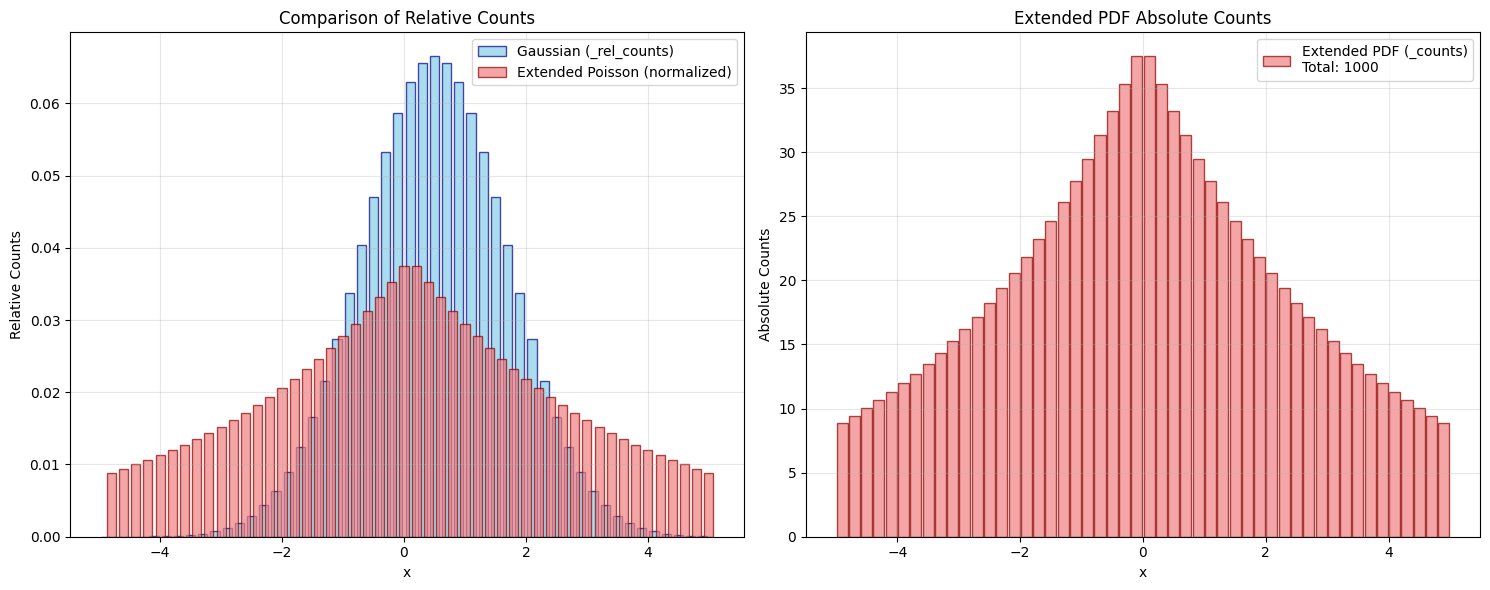
Left plot: Relative counts comparison (both sum to 1)
Right plot: Absolute counts from extended PDF (sum to total_events parameter)
Summary#
In this tutorial, we covered how to create custom binned PDFs in zfit using two key methods:
Key Concepts Learned#
_rel_countsMethod:Returns normalized counts (sum to 1.0)
Used for standard binned PDFs
Ideal for shape-only analyses
_countsMethod:Returns absolute counts (sum to total events)
Used for extended binned PDFs
Required when total events is a fit parameter
Implementation Pattern:
Inherit from
zfit.pdf.BaseBinnedPDFDefine parameters in
__init__Implement one or both count methods with proper decorators
Access binning through
self.space.binning
Examples Demonstrated#
Basic Custom Binned Gaussian with
_rel_countsExtended Poisson-like PDF with
_countsVisual comparisons between different approaches
Best Practices#
Always use
@zfit.supports(norm="space")decoratorsUse
znp(zfit numpy) for numerical operationsEnsure
_rel_countsoutput sums to 1.0Set
extended=Truewhen implementing_countsAccess bin information via
self.space.binning.centers[0]
Custom binned PDFs open up powerful possibilities for template-based analyses, Monte Carlo studies, and situations where binning provides computational or statistical advantages over unbinned approaches.
For more advanced topics, see the Custom Models guide and Binned Models tutorial.